
How IsolaDesk protects your accounts
What stays on your Mac, what our license server knows, what IsolaDesk does inside WhatsApp Web, and the limits you should know about. The legal details are in our Privacy Policy.
Your conversations never reach us
Each workspace talks directly to WhatsApp. There’s no IsolaDesk account, no analytics, no advertising and no telemetry.
Stays on your Mac
- Your WhatsApp sessions, chats, contacts and mediaOne separate folder per workspace
- Your workspace names, colors and settings
- Your license key and app passcodeIn the macOS Keychain; the passcode only as a hash
Reaches our license server
- Your license key and the email used at checkout
- A pseudonymous device IDA one-way hash, not your serial number
- Your Mac’s name and the app versionThe name may include your first name
One isolated session per workspace
Each workspace runs WhatsApp Web in its own persistent browser session, with its own cookies, local storage, databases, cache and service workers. Workspaces never share a login or any data: one account can’t see another, and signing out of one leaves the others untouched.
 IsolaDesk on your Mac
When you delete a workspace, IsolaDesk clears its session data. From version 3.2, its folder is also removed from the disk the next time IsolaDesk starts.
What stays on your Mac
| Data | Where | Notes |
|---|---|---|
| WhatsApp sessions (login, cached chats and media) | ~/Library/Application Support/IsolaDesk/Partitions | One folder per workspace, written by WhatsApp Web itself. IsolaDesk never sends it anywhere. |
| Workspace list and settings | ~/Library/Application Support/IsolaDesk | Names, icons, colors, order and preferences. The export contains only the names, icons, colors, order and settings of your workspaces. |
| License key and license token | macOS Keychain | Service com.isoladesk.app. |
| App passcode | macOS Keychain | Stored as a salted scrypt hash, never in clear text. |
| Free trial dates | Keychain and Application Support | Counted locally; nothing is sent to us for the trial. |
| Diagnostic log (version 3.2) | ~/Library/Application Support/IsolaDesk/logs | The app’s own errors only, with keys and email addresses masked. It leaves your Mac only if you copy it into an email. |
To remove everything, see how to uninstall IsolaDesk and delete its data.
What our license server knows
The license server only knows what it needs to sell you a subscription and check that your license is valid:
- Your subscription: the email used at checkout, your license key, the amount and currency paid, your language, Stripe’s customer and subscription references, and the subscription’s status and dates.
- Each activated Mac: a pseudonymous device ID (a SHA-256 hash of the Mac’s hardware identifier, which can’t be turned back into it), the Mac’s name as set in macOS, the IsolaDesk version, and the dates of activation and of the last license check. A Mac’s record is deleted when you deactivate it.
- An activity log of what happened to your license (created, Mac activated or deactivated, email sent, action by our support). It never contains license keys.
It never receives your messages, contacts, phone numbers, WhatsApp logins or anything you do in WhatsApp. Your IP address is used for a moment to limit abusive requests; it isn’t stored in the license database, and technical logs of the license server are kept for no more than 7 days. Payment details stay with Stripe: we never see your card number.
Signed licenses, checked offline
When you activate IsolaDesk, the license server returns a license token signed with an Ed25519 key. The app checks that signature with the public key built into it, and checks that the token belongs to this Mac. That check happens offline, at every launch.
When you’re online, IsolaDesk quietly renews the token before it expires, which is also how it learns about a renewal, a cancellation or a refund. Offline, a valid license keeps working for several weeks. From version 3.2, tokens also name the key that signed them, so that key can be replaced without asking anyone to reactivate.
Network connections
Besides the WhatsApp Web pages loaded in your workspaces, which talk to WhatsApp’s own servers, IsolaDesk connects to:
- api.isoladesk.app, to activate, refresh or deactivate your license, or to have a lost key emailed to you;
- isoladesk.app/version.json, to check whether a new version is available. That request contains nothing about you or your workspaces, only what any web request carries, such as your IP address and the app version.
Links to our website and to Stripe’s customer portal open in your own browser. There is no analytics, no crash reporting sent to us and no advertising, in the app or on this website.
What IsolaDesk does inside WhatsApp Web
IsolaDesk displays the regular WhatsApp Web. To be transparent, here is everything it adds or changes:
- It presents itself to WhatsApp Web as a standard Chrome browser of the same version as the one built into the app, because WhatsApp Web doesn’t accept the default identification of desktop apps.
- A small script applies your notification settings (sound and, from version 3.2, message previews and notifications for each workspace) and hides message content in notifications while IsolaDesk is locked.
- Workspaces can only open WhatsApp Web, over HTTPS. Other links open in your browser.
- WhatsApp Web only gets the permissions it needs: notifications, the microphone and camera after macOS asks you, copying to the clipboard, full screen and persistent storage (so your session data isn’t cleared when the disk fills up). Every other permission is refused.
Up to version 3.1, IsolaDesk also hid the banner in which WhatsApp Web promotes WhatsApp’s own Mac app. Version 3.2 no longer does.
The app lock
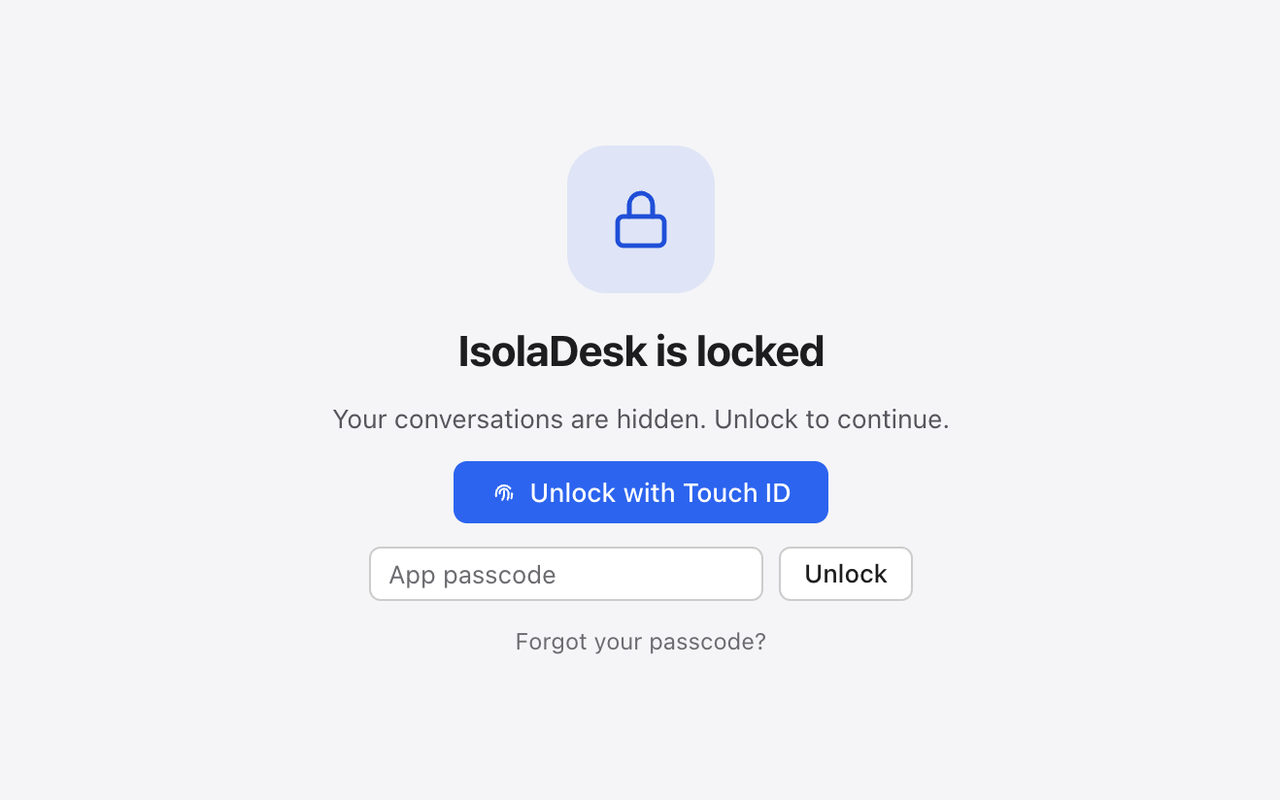
In IsolaDesk › Settings… › Privacy, you can lock IsolaDesk after a period of inactivity and when your Mac sleeps or its screen locks. Unlock with Touch ID or with an app passcode of at least 4 characters. While IsolaDesk is locked, your workspaces are hidden and, from version 3.2, notifications show neither the sender nor the message.
Honest limits
- The lock isn’t encryption. It hides your workspaces on screen. The session files on your disk are protected by macOS, like your other files: turn on FileVault, and give each person who uses the Mac their own macOS user account.
- Anyone who can use your unlocked macOS account can copy files from it, including IsolaDesk’s session folders.
- WhatsApp stays in charge. WhatsApp can log a linked device out, change WhatsApp Web or restrict an account at any time. Each workspace appears in WhatsApp › Linked devices on the phone, where you can disconnect it.
- Updates are manual. IsolaDesk tells you when a new version is out, and you install it yourself from the download page.
- Uninstalling the app doesn’t delete your data. Delete the folder
~/Library/Application Support/IsolaDeskas well.
Updates and code signing
IsolaDesk isn’t yet signed with an Apple Developer ID or notarized by Apple. That’s why macOS asks you to allow it the first time you open it (how to). Only download IsolaDesk from this website: we never send the app by email or through other sites. Releases are listed on the What’s new page.
Report a vulnerability
Found a security issue in the app, this website or the license server? Email support@isoladesk.app with “Security” in the subject, a description and the steps to reproduce it. Please give us a reasonable amount of time to fix it before making it public, and never access other people’s data or accounts while testing. We don’t run a paid bug bounty program, but we’ll reply and keep you informed. Our contact details are also published in security.txt.