With your consent, Google Analytics measures our audience, Google Ads and Meta measure the results of our ads, our affiliate program (Tolt) records the partner who sent you, and Google may show you personalized IsolaDesk ads, using cookies and data about your visit. Refusing changes nothing else. Change your choice anytime with “Cookie settings”. More about cookies
IsolaDesk opens each of your WhatsApp numbers in its own isolated workspace on your desktop. Here is every step, and what really happens behind each one.
Enter your email on the free trial page. Your activation key appears at once and is emailed to you: 30 days of Pro, no card, and nothing is charged when it ends.
2
Install IsolaDesk
Download the version for your computer. On a Mac (Apple Silicon or Intel, macOS 12+), open the .dmg file and drag IsolaDesk onto Applications: the app is signed with an Apple Developer ID and notarized by Apple. On a Windows PC (Windows 10 or 11, 64-bit), run the installer: it is code-signed by HAVEN GLOBAL SERVICES LTD, and Windows shows that name as the publisher.
3
Paste your key
Open IsolaDesk and paste the key. It checks it with our license server, then Pro unlocks on this computer: up to 20 workspaces, on 2 computers (Mac or PC) with the same key.
4
One workspace per number, one QR code
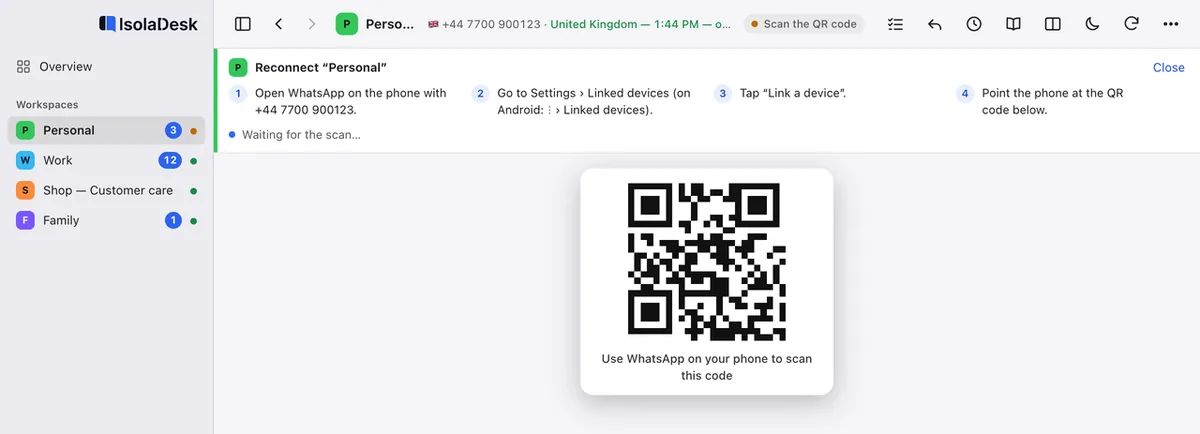
Add a workspace, give it a name and a color, then scan its QR code with that number’s phone in WhatsApp › Settings › Linked devices › Link a device. Repeat for each number.
Good to know
What happens behind the scenes
Your phone stays needed
Each workspace is a linked device of a number, exactly like WhatsApp Web, so every number still needs WhatsApp on a phone. WhatsApp may log a linked device out, for example when the phone has been offline for about 14 days; you then scan a new QR code.
Sessions kept apart
Every workspace has its own isolated session, with its own login, cookies and storage. Accounts can’t see each other, mix up or log each other out, and you can log out or reset one without touching the others.
Your chats never reach us
Messages, contacts, media and sessions travel only between your computer and WhatsApp. Our license server only receives your license key, a pseudonymous device ID, your computer’s name and the app version. Security details
Day to day
Once your numbers are linked
The Overview shows every workspace with its unread count; ⌘1 to ⌘9 jump straight to one.
Notifications name the workspace they come from, so you know which number is being written to.
Show up to four workspaces side by side, each framed in its own color.
Lock the app with a passcode, or Touch ID on Mac, and blur every conversation with one shortcut when someone looks over your shoulder.
Keep follow-ups in Tasks (⇧⌘T) beside your chats, and, if you want, turn on the assistant to translate or transcribe the messages you receive.
IsolaDesk never sends a message for you and automates nothing: it shows WhatsApp Web, one workspace per number.
Want the details of each step? The Help center covers installation, activation and moving to a new computer, and the FAQ answers the usual questions.
IsolaDesk is an independent app, not affiliated with WhatsApp or Meta.
30-day free trial
Every feature of Pro, no card: just your email. If IsolaDesk fits your day, keep it from $14.99/year, with taxes and every update included.